Total revenues overview
On the > , an overview is displayed with all the applicable order revenues that are invoiceable along with costs, margin and markup percentage for the order. This enables service managers to understand the profit/loss on an order at a glance. The following fields are displayed in the overview:
• Type
• Total revenues excl. tax / VAT
• Tax / VAT amount
• Total revenues incl. tax / VAT
• Total costs excl. tax / VAT
• Tax / VAT amount total costs
• Total costs incl. tax / VAT
• Margin
• Markup percentage
Example:
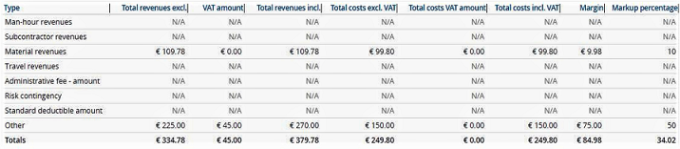
Per order revenue type, the overview provides the breakdown of total revenues, total costs with margin and markup percentage for the order.