Rentable units
You can view all relevant data of rentable units within a property, grouped by rentable unit type and by property, in a single screen.
1. Go to the Asset details page of the asset/property you wish to view or edit.
2. In the navigation panel, select Input > Rentable units. The following screen appears:
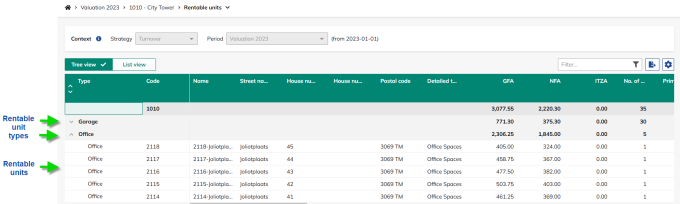
 | You can choose between Tree view and List view. In the list view, you can override the rentable unit type, and this change will also update the tree view. |
Field | Description |
|---|---|
Type | Displays either the original rentable unit type from the source or the custom type defined by the user. |
Code | Unique business identifier for the rentable unit. This identifier must remain consistent across all data loads. |
Name | Displays the rentable unit's primary name. |
Address | Displays the rentable unit's address: street name, house number, house number suffix, postal code. |
Detailed type | Displays the rentable unit's detailed type (High rise apartments/flats, Low rise apartments/flats, Other Housing With Shared Facilities, Other Residential, Free Standing Office, Office Terrace, Office Park, High Rise Office, Low Rise Office, Medical Offices, Other Offices). |
DAEB status | Displays whether the rentable unit is DAEB or non-DAEB. |
GFA | The total area of a rentable unit, including spaces that cannot be occupied or designated for exclusive use. Measurement must comply with applicable local standards. |
NFA | The total usable area within a rentable unit, measured to the internal face of the perimeter walls. This excludes non-usable spaces such as structural elements. Measurements must comply with prevailing local standards and align with the values stated in lease contracts. |
ITZA | The total area assessed using the ITZA method, which standardizes retail rental valuations by referencing the most valuable section of the space—Zone A. This approach enables consistent comparison of retail units based on their prime frontage. |
No. of units | The total number of units of the rentable unit. |
Primary energy performance | The calculated or measured amount of energy required to meet the building’s typical energy demand, including heating, cooling, ventilation, domestic hot water, and lighting. |
Energy label | Energy label based on the EU Energy Performance Certificate (EPC). |
Estimated rental value (ERV) | This is a grouped column consisting of the ERV quantity, ERV method, and ERV outcome. You can collapse or expand this group, and when collapsed, only the ERV outcome is visible. By default, both the ERV quantity and ERV method are editable. If required, you can select another method from the drop-down list. You can select one of the following options: • per annum/quarter/month/week • m2 NFA p.a. / p.q./ p.m. / p.w. • m2 GFA p.a. / p.q./ p.m. / p.w. • m2 ITZA p.a. / p.q./ p.m. / p.w. • per unit p.a. / p.q./ p.m. / p.w If the relet date occurs before the rent cap end date, the ERV is limited by the rent cap. In this case, the capped ERV equals the relet rent. |
Passing rent | Displays the passing rent for the rentable unit per annum (default setting). If required, you can select another method from the drop-down list. You can select one of the following options: • per annum/quarter/month/week • m2 NFA p.a. / p.q./ p.m. / p.w. • m2 GFA p.a. / p.q./ p.m. / p.w. • m2 ITZA p.a. / p.q./ p.m. / p.w. • per unit p.a. / p.q./ p.m. / p.w When multiple rentable units are covered under a single contract line, the passing rent is distributed according to the defined allocation key. |
Lessee | Displays the lessee from the main contract for the active contract line of type 'passing rent' linked to the rentable unit. If the unit is vacant on the reference date, 'vacant' will be shown. |
Rent cap | A rent cap is a regulatory mechanism implemented by a government or local authority to limit the maximum rent that can be charged upon relet. The rent cap restricts the Effective Rental Value (ERV) until its end date. In the case of the Netherlands, the rent cap is automatically calculated if the system's rentable unit type is a dwelling and the WWS points are provided. This automatically calculated rent cap acts as a maximum, meaning if a value is entered, it will be capped at the automatically calculated rent cap. This field displays the rent cap for the rentable unit per annum (default setting). If required, you can select another method from the drop-down list. You can select one of the following options: • per annum/quarter/month/week • m2 NFA p.a. / p.q./ p.m. / p.w. • m2 GFA p.a. / p.q./ p.m. / p.w. • m2 ITZA p.a. / p.q./ p.m. / p.w. • per unit p.a. / p.q./ p.m. / p.w |
End date rent cap | Displays the rent cap's end date. |
Review rent | Displays the review rent for the rentable unit. This is a grouped column consisting of the quantity, method and review rent outcome. You can collapse or expand this group, and when collapsed, only the review rent outcome is visible. If required, you can select another method from the drop-down list. You can select one of the following options: • per annum/quarter/month/week • m2 NFA p.a. / p.q./ p.m. / p.w. • m2 GFA p.a. / p.q./ p.m. / p.w. • m2 ITZA p.a. / p.q./ p.m. / p.w. • per unit p.a. / p.q./ p.m. / p.w |
WWS points | Displays the WWS points for the rentable unit. The WWS (Woningwaarderingsstelsel) is a points-based system used by the Dutch government to determine the maximum allowable rent for a dwelling. This field applies when the system's rentable unit type is a dwelling and the country is the Netherlands. |
WWS table | Displays the WWS table for the rentable unit. The WWS table (Housing Valuation System table) is a regulatory table defined by the Dutch government that sets the maximum statutory rent based on the WWS points, limiting the maximum rent that can be charged upon relet. This field is applicable when the system rentable unit type is a dwelling and the country is the Netherlands. |
Tax value | Displays the assessed value of a rentable unit, which is used for taxation purposes. By default, this value is expressed per m² NFA. If required, you can select another option from the drop-down list: m² GFA, m² ITZA, Per unit, Total value. |
Rebuild value | Displays the assessed value of a rentable unit for insurance purposes. By default, this value is expressed per m² NFA. If required, you can select another option from the drop-down list: m² GFA, m² ITZA, Per unit, Total value. |
Vacant possession value (VPV) | Displays the rentable unit's Vacant Possession Value (VPV), which is the market value of the property assuming it is unoccupied and free from any lease or tenancy agreements. By default, this value is expressed per m² NFA. If required, you can select another option from the drop-down list: m² GFA, m² ITZA, Per unit, Total value. |
Start date | Displays the rentable unit's start date: the date on which a rentable unit is acquired. Rentable units within the same property may have different start dates to accommodate partial acquisitions. The start date affects the calculated amounts for both operating and investing activities. |
End date | Displays the rentable unit's end date: the date on which a rentable unit is disposed of. Rentable units within the same property may have different end dates to accommodate partial dispositions. The end date affects the calculated amounts for both operating and investing activities. |
Renovation year | Displays the year in which the last major renovation of the rentable unit was completed, or the planned year of completion for the refurbishment. On rentable unit type and property level, the average renovation year of the underlying rentable units is shown. |
Construction year | Displays the year in which the rentable unit was constructed. On rentable unit type and property level, the average construction year of the underlying rentable units is shown. |
End date privatization restriction | End date privatization restriction is a regulatory mechanism imposed by a government or local authority. It limits real estate investors from privatizing dwellings until a specified date. Any privatization activity conducted before this date is disregarded, ensuring that no rentable unit is privatized prior to this date. |
Real property right | Displays the legal conditions under which the land on which the rentable unit is situated is owned. |
Monument type | Displays the rentable unit's monument type. Possible values: National monument, Province monument, County monument, Protected county view. |
Memo | If a memo is attached to a rentable unit, it is shown in this column with a page icon. Clicking the icon opens a sliding panel where you can view the memo. |