Configuring labor hour registration for team members working on the same assignment
With the Manage team member(s) action enabled, PMFS app users can:
• temporarily add or remove members from their own team to / from a personal work assignment while they are executing the task. The app will support them with a correct registration of running labor hours for everyone who has actually been working on the task.
• temporarily add external technicians / tradespeople.
This feature becomes available to app users when the work assignment is on the mobile device in one of the following statuses: Accept, Work, Wait, Pause, Travel.
Prerequisites and rules:
• The Add labor hours (date-time based) setting must be activated. See: Configuring labor hour registration in the
PMFS solution
.
• Only tradespeople / engineers who first accepted the work assignment are able to 'manage' the labor hour registration of the temporary team.
• There is a maximum of 10 team members allowed to work on a work assignment (including the person who was assigned the work and any external co-workers).
• Labor hours for internal team members always use the default Tariff group linked to their personnel record.
• For information on how to prepare labor hour registration for externals, see Configuring external labor hour registration.
• Labor hours that are created automatically can be edited or deleted.
Procedure
1. Go to the Work Assignments module and select the relevant sub web definition. For example: PPM orders.
 | The setting must be activated per relevant sub web definition! |
2. At the bottom panel, select the Labor hours details page.
3. In the data section, select the Actions tab.
4. Select Manage team member(s).
5. Go to the Action properties on the right and set the Is visible setting to Yes.
6. Save.
7. Navigate to the Manage team member(s) wizard page.
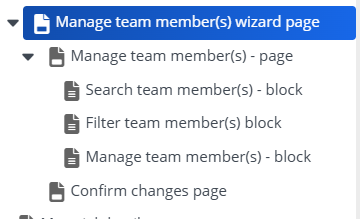
On this main page and related subpages and blocks you can make changes to page titles, placeholders, messages and labels. To some blocks you can add fields.
8. To add an additional button for adding external co-workers to a team, select the Manage team members page.
9. On the data panel, select the Actions tab.
10. Select Add external team member.
11. At Action properties, select Yes in the Is visible field.
12. Save.
The Manage team member(s) action is activated and configured on the app. Engineers can temporarily add team members (internal and external) to the work assignment they are working on, with automatic labor hour registration.