Generating the Lease overview report (old)
 | The Lease overview report only displays values if the contract lines (amounts) included in the report have the status Precalculate, Active, Expired or Terminated, Asset return. |
1. In Contracts, go to .
2. On the action panel, click Report.
The Reporting window opens.
3. Click the System reports tab.
4. Select the Lease overview report.
5. Edit report settings, if required.
| | For more information on editing report settings for the Lease overview, see Editing the Lease overview report settings. |
6. Select relevant output options for your report.
Editing the Lease overview report settings
1. Go to the selection step.
2. On the System reports tab, select the Lease overview report.
3. On the action panel, click Edit report settings.
The Report settings - Lease overview window opens.
The following options are available:
◦ Title: Enter a report title. By default, the report name is populated.
◦ Subtitle: Enter a subtitle here, if required.
◦ Accounting standard: Select ASC842 or IFRS16. All contract lines based on the selected standard will be included in the report.
◦ Based on contract currency?: Specify whether you want to display the contract currency (Yes) or the functional currency (No) in the report.
◦ Cluster by week periods: For 4-4-5 lease accounting, click Yes if you want to cluster the week entries in your report by week periods (as determined by your 4-4-5 calendar). If you click No, the report will display week entries.
Data in the Lease overview report
The Lease overview system report can be used to report on:
• lease and sublease
• portfolio lease where individual leases are combined under one main contract
• a combination of leases
| | Depending on the contract lines included in the report, information is displayed from different perspectives: Lessor / Lessee, Operating lease / Finance lease. If you are using multiple currencies, the complete report is displayed for each currency, grouped by currency. |
The report consists of the following sections.
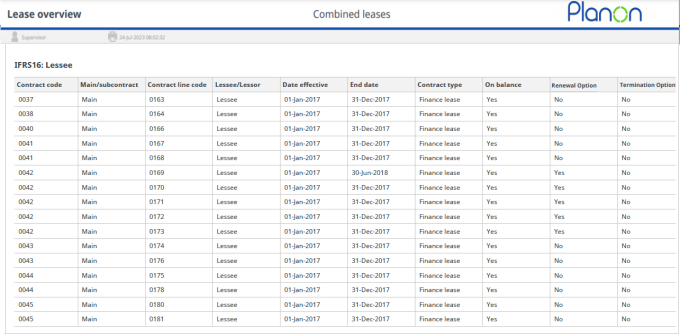
Details per contract line, the related contract and contract options
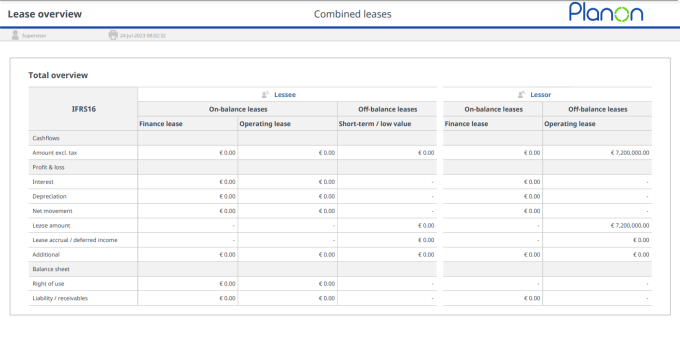
A total overview of the selected leases, for both lessor and lessee. The totals of cashflow, P&L and balance sheet data are shown.
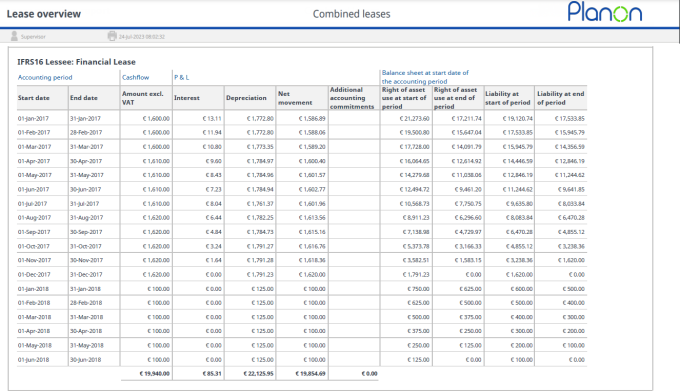
Per combination lessee/lessor and finance/operating lease, the selected commitments are shown.
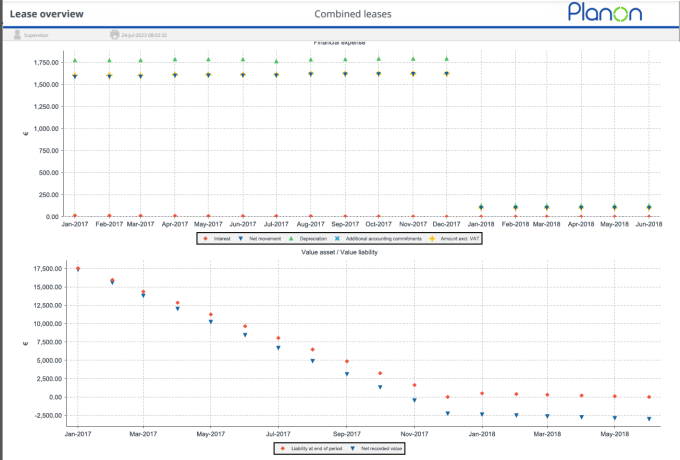
The last section of the report shows a graphical representation of the commitment data.