Improved and Phased-Out Features
Improved features introduce new functionality in the Planon application that replaces an earlier implementation and is not backward compatible.
Breaking change
An improved feature includes a breaking change, which is any modification to the product that causes existing customer functionality to stop working or behave differently, requiring customers to adjust their workflows, configurations, or integrations.
Examples of breaking changes include:
• Calculation logic has changed, producing different results.
• Reports are changed and current reports are no longer available or accurate.
• An interface with an external system is broken.
As a rule of thumb: if customers must make changes on their side to keep things working, the change is considered a breaking change.
Why does Planon introduce Improved Features and breaking changes?
Planon continuously improves the product to deliver smarter, faster, safer, and more efficient solutions. Sometimes, these improvements cannot be implemented in a fully backward-compatible way. Older functionality may:
• Limit further innovation or performance improvements.
• No longer meet security, compliance, or accessibility standards (for example, WCAG 2.1).
• Create excessive technical debt that makes maintenance and support increasingly difficult.
• Cause inconsistent behaviour across modules or interfaces.
In these exceptional cases, Planon must replace the old implementation with a new one – even if this means introducing a breaking change.
Preparation
The Improved Features and Phased-out Features TSI (System Settings) provides an overview of all improved features available in Planon. These features are not activated automatically during an upgrade.
Application Managers decide when to activate an improved feature. Activation must take place before the specified deadline, giving Application Managers full control over when and how the new functionality is implemented.
The preparation period for an improved feature has a deadline, which is either an expiry date, or a release expiry number:
• Expiry date - date in the Preparation deadline field)
When upgrading, an improved feature whose expiry date has passed is automatically activated.
• Release expiry number - release number in Release expiry date field
The improved feature will not be activated unless you upgrade to a later release than the release expiry number.
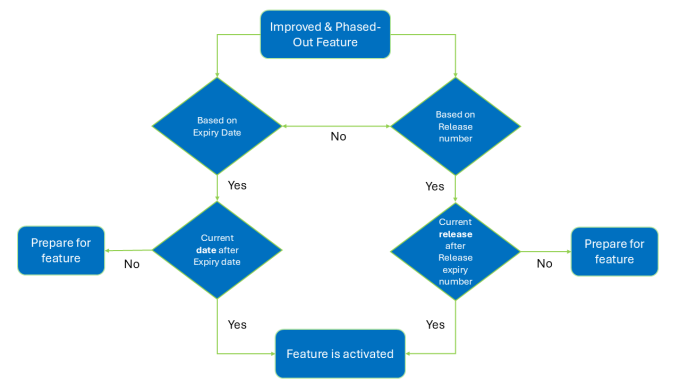
In the preparation phase, application managers can activate an improved feature in a Test environment and move this to Production before the deadline is met.
 | An improved feature whose deadline has passed - whether it is an expiry date or a release expiry number - is automatically activated. Automatically activating an improved feature is only performed when you upgrade to a newer release (true for Cloud and on-premise installations). In a Cloud environment, this means that a restart or installing a hotfix will not activate an improved feature. |
Application managers can prepare for the new feature, by:
• Adapting interfaces with other systems.
• Changing Planon configurations.
See: Analyzing the impact of an improved feature for additional information.
• Adapting TMS implementation.