SDK
It is possible to switch the Planon SDK to OpenID Connect (OIDC) authentication in the Environment management gadget.
 | This will currently break the Planon AutoCAD Plugin implementation, so if the Planon AutoCAD Plugin integration is used, do not switch your enviroment to OIDC authentication. This will be fixed in a newer version of Planon so that the Planon AutoCAD Plugin will support OpenID Connect in the near future. |
The default behavior of the SDK is unchanged, this means if no additional configuration is done, form authentication and Planon access key is present.
Planon Cloud configuration
1. Enable OpenID Connect authentication for SDK in the Environment Management gadget.
| | In order to see this option, your environment must be running on the latest Cloud platform and SSO must be enabled. |
2. In Keycloak, create a client with a self chosen client name (in the following image: sdk-example1. The root URL should be equal to the SDK interface URL.
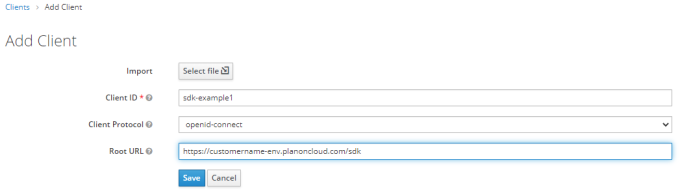
3. In the next screen, configure the client to meet up to your security policies and save the changes.
| | • Both Client credentials as well as Authorization code flow are supported. • When using Client credentials flow make sure that Service account is enabled. |
4. In Planon make sure a user is present that can be used by the configured client above. When Client Credentials flow is used, a service account user for the client must be present in Planon.
Example
If the client name is sdk-example1, than a user with the account name service-account-sdk-example1 must be present and active in the Planon application.
Usage
To get access to the SDK service via OpenID Connect, take the following steps:
1. Retrieve an access token at the keycloak service via the Client created in the installation step.
2. Send this token as Bearer token to the Planon SDK service.
Troubleshooting
The following table lists a few common errors.
Error | Description |
|---|---|
401 Unauthorized | Either no access token or an expired access token has been sent to the Planon application. |
500 Internal error | The user account does not exist in the Planon application. |