Editing a recurrent booking
You can update the details of an existing recurrent booking. The editing option is available for all booking types.
1. On the All reservations page, select the reservation you want to edit.
The Reservation details page is displayed.
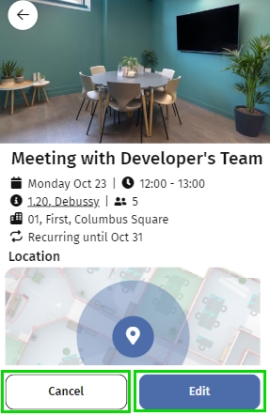
2. Click Edit.
3. From the Available options pop-up select:
◦ Edit this reservation
- On the Edit reservation page, edit the fields as required.
 | The date and time of a single occurrence in a recurring booking can be updated without creating a new reservation. |
- Click Update to save the changes.
◦ Edit series
- On the Edit series page, edit the fields as required.
- Click Update to apply the changes to all occurrences.
It is confirmed that the reservation is updated successfully.
4. Tap Close.
You are redirected to the Start page. You can find all your updated reservations under All reservations page.