JIT user provisioning
Just-in-Time (JIT) user provisioning is a method for automating the creation of user accounts in web applications.
 | JIT user provisioning is currently available exclusively as a Cloud feature. |
JIT user provisioning in a nutshell
JIT user provisioning leverages federated identity protocols, standards that enable users to access multiple applications or systems using a single set of credentials managed by a trusted identity provider, such as OpenID Connect (OIDC), to pass user identity information from an external Identity Provider (IdP), like Keycloak, to Planon.
When a new user logs in to Planon for the first time via Single Sign-On (SSO), the system automatically creates a corresponding user account using the information provided by the IdP.
Benefits
The benefits of using JIT user provisioning are multiple:
• Enhanced security: Only authenticated users from the IdP can access the Planon application.
• Reduced administrative overhead: No need for IT teams to manually create user accounts.
• Improved user experience: Users can access the Planon application immediately after their first login.
• Simplified onboarding: New users are onboarded quickly and efficiently.
How it works
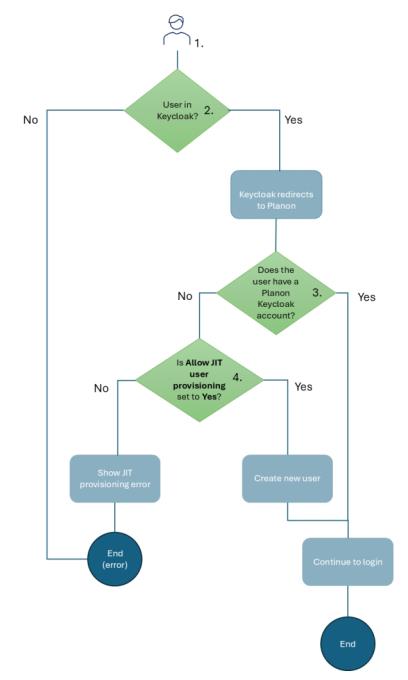
Represented in a series of steps, the flow is as follows:
1. The user attempts to access the Planon application using Single-sign-on (SSO).
The user is redirected to Keycloak, the configured Identity Provider (IdP), using the OIDC authentication flow.
2. No: the user is not known in Keycloak, consequently, an error message is displayed.
Yes: the user is known in Keycloak. The user is redirected back to the Planon application with an ID token (and optionally an access token) containing verifiable claims about the user (Subj, the Keycloak identifier, and Preferred_username the account name).
3. Planon validates token and extracts the username (and potentially other claims) and verifies whether the user has a Planon Keycloak account.
Yes: the user is authenticated and proceeds to log on to the Planon application.
No: a check takes place to verify whether Just-in-time user provisioning activated? is enabled.
4. Yes: a new user account is created in the Planon application. This account will:
◦ Have the username provided by Keycloak
◦ Be linked to the default user group
The account will be logged on and the Planon interface will be displayed.
No: an error message is displayed.
Graphically, this flow is depicted as follows: