Using multiple currencies (optional)
If you have companies or objects/projects in multiple countries, each with their own (local) currency, you can use multiple currencies in the application. This applies to both data entry and data import, as well as output in the form of financial statements and reports.
The available currencies and corresponding exchange rates against the base currency are defined in the Master data application.
The local currency is also recorded for each entity in the Master data application. See Planon RE Master data for more information.
The image below further explains how multiple currencies work in RE Finance .
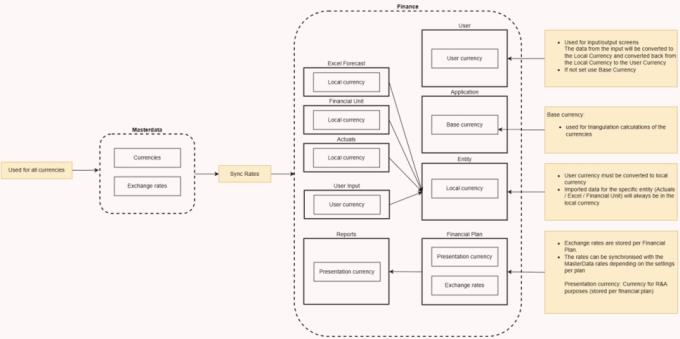
Explanation of the terms used:
• Base currency: Currency used for cross-currency triangulation. Cross-currency triangulation converts a source currency into a base currency and then into the target currency. This means that only the exchange rates between the base currency and the other currencies need to be recorded, rather than every possible currency pair. The base currency is set once when the application is implemented and cannot be changed afterwards.
• User currency: The currency in which the user enters data into the application and views the output on the screens and in-app reports. The user currency is displayed at the top right of the application screen.
• Local currency: The currency in which an entity's data is stored in the application's database. Excel forecasts, Actuals, and Reaforce projects are always imported in the Entity's local currency. RE Assets objects are always imported in the local currency of the object in question (as defined in RE Assets ). If the object's local currency differs from the local currency of the entity into which it is imported, it will be converted to the entity's local currency at the exchange rate specified in the Financial Plan.
• Presentation currency: The currency in which a Financial Plan's data is stored and displayed in the R&A database. The presentation currency is specified for each Financial Plan and cannot be changed after a Financial Plan has been created.
If you don't use multiple currencies, the base currency will automatically be used as:
◦ User currency
◦ Local currency
◦ Presentation currency