Job list - grouping and sorting
The grouping and sorting criteria that are applied to the job list require some explanation.
Sorting on the Assigned tab
On the Assigned tab, your work assignments are sorted based on:
• the date-time of the work assignment (nearest start date-time or requested completion date-time at the top),
 | The type of date-time information that is displayed depends on your configuration. The displayed date-time can be an SLA related date-time of the related order, or the Planned start date-time of the work assignment. For more information about configuring the date-times, see Linking user groups and configuring the Start page. |
• whether it is a high priority assignment or not,
• order type ('reactive' assignments are ranked higher than 'planned' work),
• whether the assignment is a personal or a team assignment,
• work assignment code.
In short: Work assignments that are high priority, reactive and personally assigned to a field engineer will get the highest ranking. Non-reactive team assignments with a normal priority will be ranked lower.
Sorting and grouping on the Downloaded tab
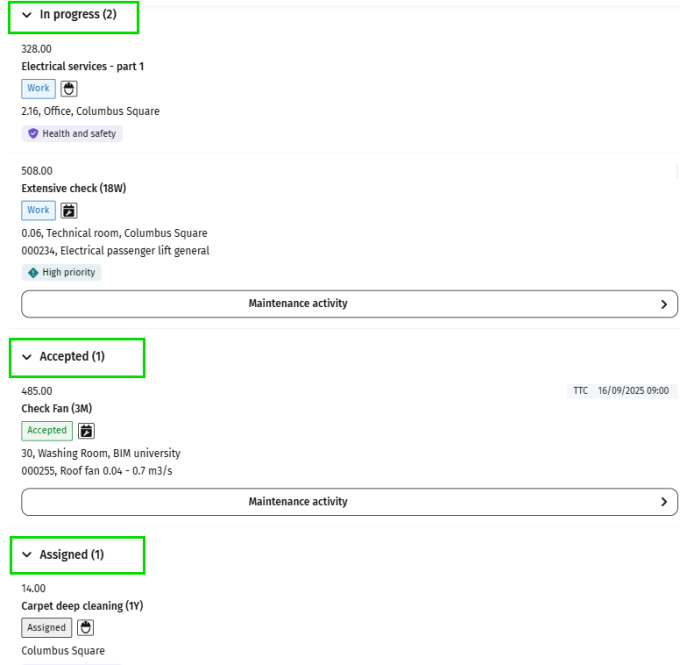
On the Downloaded tab, your work assignments are grouped according to their current status.
Within each group, work assignments are sorted based on the same criteria as on the Assigned tab.
1. At the top of the list you see the work In progress. This group includes jobs that you have already started, by selecting either Travel, Work, Wait or Pause on your mobile device.
2. The second group includes all the work you have Accepted, but not yet started.
3. The third group includes work assignments that you have only downloaded (still in the Assigned status).