Micro frontend definitions
Each micro frontend comes with a micro frontend definition. For existing micro frontends, a definition will be generated during the database upgrade process.
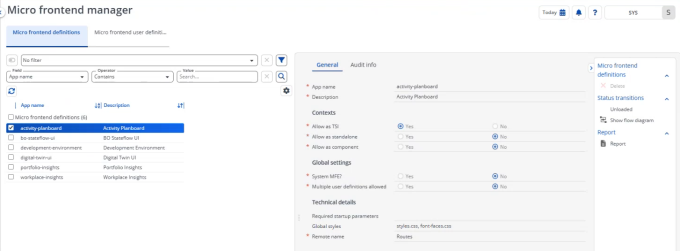
A definition has a number of settings that are read-only and cannot be amended by a user. The word settings is italicized because you cannot actually change these.
Settings
Field | Description |
|---|---|
Name | Specifies a unique name. |
Description | Provides a description for the micro frontend. |
Contexts | |
Allow as TSI | If this field is Yes, you can link a micro frontend as TSI to a navigation panel group. If a micro frontend is configured as TSI or standalone, a user-defined definition must exist. |
Allow as standalone | If this field is Yes, you can make the micro frontend definition available as an externally accessible URL. If a micro frontend is configured as TSI or standalone, a user-defined definition must exist. |
Allow as component | If this field is Yes, you can embed the micro frontend definition in the data panel grid. Because this type of micro frontend can be integrated into the Planon application, its use is restricted to Planon-defined implementations. Typically, developers load this type of micro frontend programmatically, rather than through user configuration. When a micro frontend is defined as a component, any existing user-specific configuration is disregarded. To ensure successful loading within the Planon application, the micro frontend must be uniquely identified. This requirement overrides any user definition. From a technical perspective, the micro frontend is loaded via the app-shell component. |
Global settings | |
System MFE? | Indicates whether a micro frontend definition is identified as functionality that is deeply embedded in the Planon application and - for that reason - cannot be amended. |
Multiple user definitions allowed? | Indicates whether it is allowed to create a user defined version for a micro frontend definition (e.g. to discern between Public vs. Private). When enabling multiple user definitions, the backend app remains the same (with a different configuration). |
Technical details | |
Required startup parameters | Lists the startup parameters - if applicable - for the micro frontend definition. |
Global styles | References a micro frontend specific style sheet - if applicable. |
Remote name | Technically required name, no functional impact. |
Settings schema | The settings schema describes the configuration options supported by the micro frontend. It defines which settings exist and how they are interpreted by the micro frontend. The schema is read-only and maintained as part of the micro frontend implementation. |
User capabilities | |
App name | The name of the micro frontend containing user capabilities. |
User capability key | The technical identifier of a micro frontend capability. |
User capability description | The description of the micro frontend capability - for example: View floors. |
Statuses
Micro frontends can have one of two statuses (visible when you click Show flow diagram in the action panel):
• Loaded
• Unloaded
By default, micro frontend definitions are Loaded. Users cannot change the status to Unloaded.
If a new version of Planon is made available that no longer contains a micro frontend definition, the existing micro frontend is set to Unloaded.
When the status is Unloaded, it becomes possible to Delete the micro frontend. This is the only action possible for users.
By deleting a micro frontend definition, you remove historical data that is maintained by the Planon application.