Automatically zooming to a selected space
Configure and use the Auto-zoom on selected space option to automatically zoom to a selected spaces in the CAD drawing.
The Auto-zoom on selected space option automatically zooms to a selected space in the CAD drawing. This makes it easier to locate spaces on large floor plans and improves navigation between the element list and the CAD drawing.
Configuration
To use this feature, enable the Auto-zoom on selected space step action.
1. In TSIs, select Spaces & workspaces and set it Under construction.
2. Select the Components level > Spaces step.
3. Under Linked step actions, move Auto-zoom on selected space to In use.
4. Click OK to close the dialog and set the TSI to Completed.
5. Log out and log back in.
Using the 'Auto-zoom on selected space' feature
1. Go to Spaces & Workspaces and select the required property.
2. Go to Spaces level > Spaces step.
3. Open the CAD Integrator view.
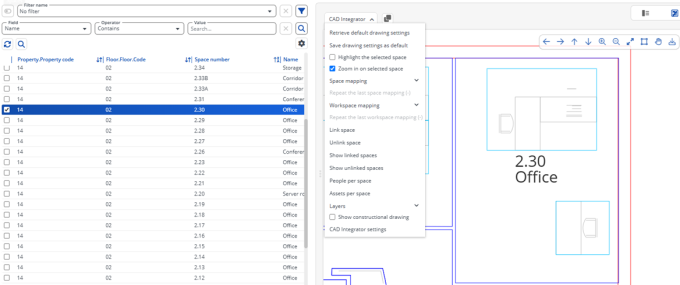
4. On the CAD Integrator menu, enable Auto-zoom on selected space.
5. Select a space in the element list.
The CAD drawing automatically zooms to the selected space.
6. Select a space in the CAD drawing.
The CAD drawing automatically zooms to the selected space, and the corresponding space is selected in the element list.
The following example shows Space 2.30 selected in the element list. The CAD drawing automatically zooms to the selected space.